
Magius Casino App
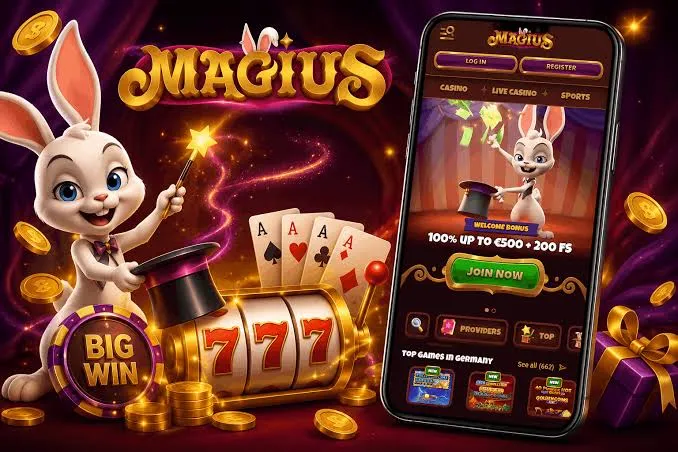

At Magius, we know that modern players want to enjoy their favourite games wherever they happen to be. That's why we've built a mobile experience that brings our entire casino and sportsbook straight to your phone or tablet, without the need to download anything from an app store. Here at Magius Casino, we offer a browser-based mobile platform that works smoothly on both Android and iOS devices, giving you instant access to slots, live tables and sports betting on the go.
In this guide, we'll walk you through how to get the Magius app set up on your device, how to log in, and what makes our mobile platform worth adding to your home screen.
Why Our Mobile Platform Works So Well
We've built our mobile site to load quickly, stay responsive during live betting, and keep navigation simple even when you're switching between the casino and sportsbook. Our magius casino app shortcut gives you one-tap access, and because it's browser-based, you're always playing the latest version - no manual updates required, no compatibility issues, and no risk of outdated software slowing things down.
Another advantage of our mobile setup is flexibility. You're not locked into one operating system or device type. Whether you're using an older Android phone or a brand-new iPhone, the experience stays consistent, and your account syncs instantly between devices.
Security on the Go
We take player security seriously, no matter which device you're using. Our mobile platform runs on the same encrypted connection as our desktop site, and your personal and payment details are protected at every step. Two-factor verification and secure login protocols help keep your account safe, and our support team is available 24/7 if you ever notice anything unusual.
How to Get the Magius App on Your Device
Since we don't offer a native app through Google Play or the App Store, our magius app download process works a little differently. Instead of installing a traditional application, you add a shortcut to our mobile website, which then behaves just like any other app icon on your home screen.
For Android Users
- Open Chrome and go to magius.com
- Tap the three-dot menu in the top right corner
- Select "Add to Home screen"
- Confirm the name and tap "Add"
- Launch Magius directly from your home screen icon
For iOS Users
- Open Safari and navigate to magius.com
- Tap the Share icon at the bottom of the screen
- Scroll down and select "Add to Home Screen"
- Tap "Add" in the top right corner
- Open the new Magius Casino icon anytime you want to play
Once installed this way, our magius app ios shortcut opens in full-screen mode, so you get an app-like feel without any of the usual download hassle or storage space taken up on your device.
Logging Into Your Account on Mobile
Whether you're brand new or already have an account with us, magius login on mobile takes just a few taps. We use the same login credentials across desktop and mobile, so you never need to remember a separate password for your phone. If you haven't registered yet, our magius casino registration process is just as quick on mobile as it is on a computer. Simply fill in your email, choose a password, confirm your details, and you're ready to make your first deposit.
For our players browsing from the UK, we've optimised the mobile site to load fast even on slower connections, and magius casino uk login works exactly the same way as anywhere else - no extra steps, no regional barriers.
What You Can Do in the Magius App
Our mobile platform isn't a stripped-down version of the desktop site - it's the full package. Here at magius, we give you access to:
- Over 3,000 slots from more than 129 providers
- Several hundred live dealer tables, including roulette, blackjack and game shows
- A full sportsbook with live betting and boosted odds
- Jackpot categories like GrandPot, Hot Jackpots and Daily Jackpots
- Our loyalty shop, Coins system, Challenges and Tournaments
Everything you'd expect from the desktop experience is mirrored on mobile, and we keep the interface clean so you can find your favourite titles without endless scrolling.
Deposits and Withdrawals on Mobile
We support a wide range of payment methods through the mobile site, including Visa, Mastercard, Interac, MiFinity, and several cryptocurrencies such as Bitcoin, Ethereum and USDT. Our magius casino withdrawal time varies depending on the method you choose - e-wallets typically process within 24 hours, card withdrawals can take between 2 and 5 business days, and crypto withdrawals are often instant to 24 hours. Keep in mind that your first withdrawal may take a little longer while our team completes account verification.
| Withdrawal Method | Typical Processing Time |
|---|---|
| E-wallets | 0 to 24 hours |
| Cards | 2 to 5 business days |
| Cryptocurrency | Instant to 24 hours |
Claiming Bonuses Through the App
Many of our players prefer managing their bonuses straight from their phone, and we've made sure that's just as easy as doing it on desktop. Our magius casino welcome bonuses of 100% up to €500 plus 200 free spins is available the moment you make your first deposit of €20 or more, whether you're on mobile or desktop. Keep in mind the wagering requirement is 35x on deposit plus bonus, with free spin winnings carrying a 40x requirement to clear within 10 days.
If you're searching for a magius casino no deposit bonus, we should be upfront that our current offers require a deposit - however, we do run regular promotions like our weekend reload and daily cashback that you can track through the app's promotions tab. We also reward loyal players through our VIP Club and Coins programme, which you can monitor in real time from your mobile dashboard.
Our Customer Support
We offer multiple ways to reach our support team directly from the mobile site:
- Live Chat: Our team is available 24/7 through the app
- Email: [email protected] for general queries
- Complaints: [email protected]
- Data Protection: [email protected]
Currently, our support is offered in English and Dutch, so most of our players can get help in their preferred language without delay.

Final Thoughts
We've worked hard to make sure our mobile experience matches the quality of our desktop platform. From quick logins to full access to slots, live tables, jackpots and sports betting, Magius Casino puts everything in your pocket without the need for app store downloads or storage-hungry installations. Add our shortcut to your home screen today, and you'll have the entire casino ready whenever you are.
FAQ
Do you have a native app I can download from the App Store or Google Play?
No, we don't currently offer a native app. Instead, we provide a browser-based mobile site that you can add to your home screen for an app-like experience on both Android and iOS.
Is the magius app download process free?
Yes, adding our shortcut to your home screen costs nothing and takes less than a minute through your phone's browser.
Can I use the same account for magius login on both desktop and mobile?
Absolutely. We use one account system across all devices, so your balance, bonuses and game history stay synced no matter where you log in from.
How long does magius casino withdrawal time take on mobile?
Processing times depend on your chosen method. E-wallets are usually fastest at 0 to 24 hours, cards take 2 to 5 business days, and crypto withdrawals are typically instant to 24 hours.
Will I miss out on any features by playing through the mobile site instead of a native app?
No, we mirror our full desktop catalogue on mobile, including slots, live casino, jackpots, sportsbook and our loyalty programme.
Is it safe to deposit and withdraw through the mobile platform?
Yes, our mobile site uses the same secure encryption as our desktop platform, keeping your payment details and personal information protected at all times.
Content updated: November 02, 2026